Have you ever copied a useful link, switched to another application, copied something else, and then realized you had lost the first item? It is a small problem, but if you use your Mac for work, coding, studying, or everyday browsing, it can become surprisingly frustrating.
The clipboard on your Mac is useful, but its standard behavior has an obvious limitation: copying something new replaces the previous item. That is where a clipboard manager can make a real difference.
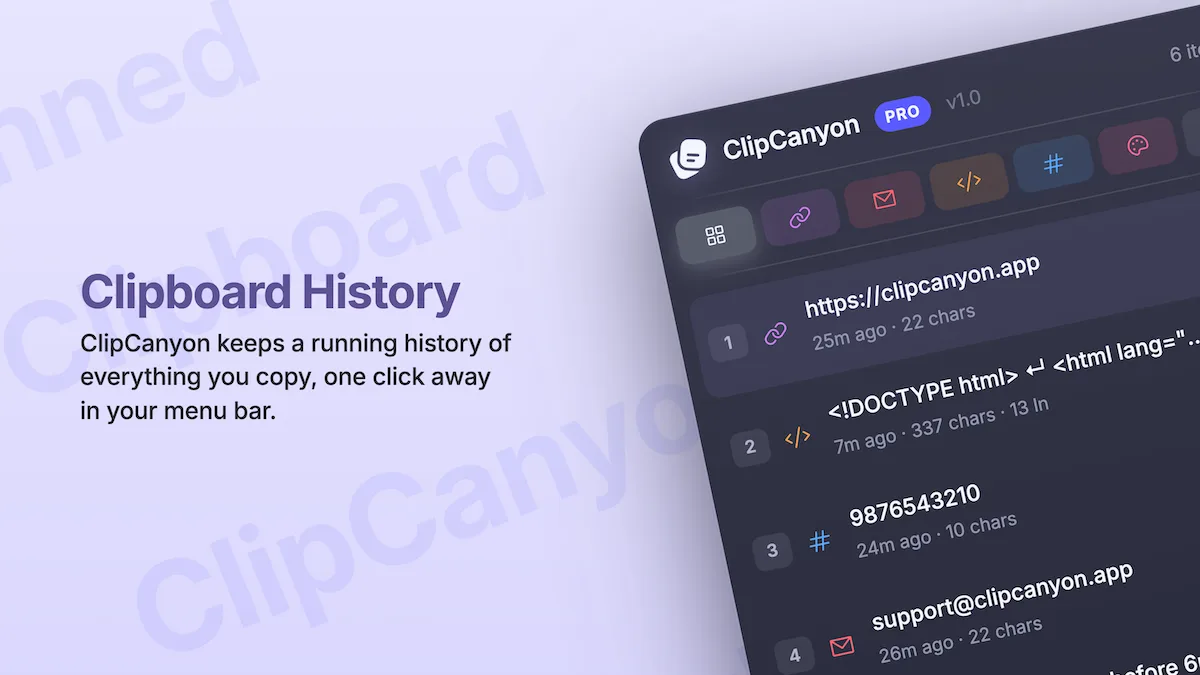
ClipCanyon is a lightweight clipboard history app for macOS that keeps your copied items organized and ready to use again. Instead of repeatedly switching between applications to find something you copied earlier, you can access your clipboard history directly from the menu bar.
What Is ClipCanyon?
ClipCanyon is a native macOS productivity application designed to solve a straightforward problem: remembering what you copied.
Think about a typical working day. You might copy a website URL, grab a code snippet, save an email address, and then copy several paragraphs into a document. When you need that original URL again, it may already be gone from your clipboard.
ClipCanyon keeps a history of copied content so you can return to earlier items without repeating the entire process.
The app lives in your Mac’s menu bar, keeping it accessible without adding another application window to your workflow. Its purpose is simple: make frequently used information easier to retrieve.
You can explore the app on the official ClipCanyon website or get it through the Mac App Store.
Key Features That Make Clipboard Management Easier
1. Access Your Clipboard History Anytime
The main benefit of ClipCanyon is that copying something new no longer means you have to forget what came before it.
Suppose you are writing an email and need to reference three different links. You copy the first link, move to another page, and copy the second. Later, you realize you also need the first one.
With clipboard history, you can find the earlier link and copy it again instead of returning to the original webpage.
This is especially useful for students preparing assignments, developers working with code, writers researching articles, and professionals who regularly move information between applications.
2. Automatically Organizes Copied Content
A long clipboard history can quickly become difficult to navigate if every entry looks the same.
ClipCanyon automatically recognizes different types of content, including URLs, email addresses, code snippets, numbers, colors, and plain text. You can use categories and filters to find the type of information you need.
For example, if you remember copying a particular website address but cannot recall the exact text, filtering for URLs can make finding it easier.
This small organizational feature can save time, particularly when your clipboard contains a mixture of technical information, contact details, and everyday text.
3. Pin Important Items for Quick Access
Some information deserves to stay accessible even when you copy dozens of other things.
You might regularly reuse a support email address, a frequently needed text snippet, or a particular reference link. ClipCanyon lets you pin important clipboard entries so they remain easy to find.
Instead of repeatedly searching through your history, you can keep useful items close at hand.
For anyone who regularly uses the same pieces of information throughout the day, this can make an ordinary workflow feel more organized.
4. Preview Before Copying Again
Have you ever copied a long block of text only to discover that it was the wrong one after pasting it?
ClipCanyon lets you preview clipboard entries before copying them again. This is particularly helpful when you have several similar snippets or longer pieces of text in your history.
Developers, for instance, might have multiple code snippets that look similar at a glance. Being able to inspect an entry before using it reduces the chances of selecting the wrong content.
It is a small feature, but it addresses a familiar annoyance.
5. A Native Mac Experience
ClipCanyon is built using Swift and SwiftUI for macOS. It stays in the menu bar rather than adding another Dock icon or a large application window to manage.
That design makes sense for a utility that you may use dozens of times a day but rarely want to think about.
The app is also lightweight, with the Mac App Store listing reporting a download size of approximately 1.1 MB. It requires macOS 14.6 or later.
Rather than trying to become an all-purpose productivity suite, ClipCanyon focuses on making one everyday task easier.
Privacy Matters When Managing Your Clipboard
Your clipboard can contain more than harmless text. It may include personal messages, work documents, email addresses, or other sensitive information.
That makes privacy an important consideration when choosing a clipboard manager.
According to its official website, ClipCanyon stores clipboard history locally on your Mac. The developer states that the app does not upload clipboard content to a server and does not use its own network calls for ordinary app functionality.
The app also lets you exclude selected applications from clipboard monitoring. For example, you can exclude your password manager to help prevent copied content from that application from entering your history.
ClipCanyon’s developer also states that the app does not collect analytics data or use advertising trackers.
These are useful privacy commitments for an application that handles potentially sensitive information. As with any clipboard utility, it is still sensible to review the privacy policy and configure application exclusions according to your needs.
You can read more in the official privacy policy.
Is ClipCanyon Free?
One appealing aspect of ClipCanyon is its straightforward pricing.
The free version is available without a subscription and includes clipboard history, automatic content categorization, pins, filters, previews, and application exclusions.
Here is how the two versions compare:
| Feature | Free | Pro |
|---|---|---|
| Items shown in the menu | 15 | 75 |
| Items kept in storage | Up to 30 | Up to 200 |
| Automatic categorization | Yes | Yes |
| Pins, filters, and previews | Yes | Yes |
| Application exclusions | Yes | Yes |
| Price | Free | $4.99 one-time |
The Pro version is a one-time purchase rather than a recurring subscription. You pay once to increase the available clipboard history limits.
For occasional users, the free version may be enough. If you copy information constantly and frequently need to revisit older entries, the additional storage available with Pro may be worthwhile.
Pricing and features should always be checked on the official website before purchasing.
Who Should Use ClipCanyon?
ClipCanyon is worth considering if you regularly switch between applications and copy information throughout the day.
- Students: Keep track of copied research links, notes, and reference material while working on assignments.
- Developers: Retrieve code snippets, commands, URLs, and other technical text without copying everything again.
- Writers and researchers: Move between source material, drafts, and reference links more conveniently.
- Office professionals: Reuse email addresses, numbers, and frequently needed text without constantly switching windows.
- Everyday Mac users: Recover something useful that was copied a few minutes ago.
It may be less useful if you rarely copy multiple items or are already satisfied with another clipboard manager. The best productivity tool is the one that solves a real problem in your daily routine.
Final Verdict: Is ClipCanyon Worth Trying?
ClipCanyon takes a simple idea and makes it practical. It gives Mac users a searchable clipboard history, automatic content categorization, pinned entries, previews, and local storage without requiring a subscription.
Its biggest strengths are its focused design, straightforward pricing, and emphasis on keeping clipboard data on the device.
It is not intended to replace a full productivity suite, and users who need extensive automation or cross-device clipboard synchronization may want a different solution. However, if your main frustration is losing previously copied text, ClipCanyon addresses that problem directly.
Sometimes, improving productivity does not require a complicated new system. It simply means removing a small annoyance that interrupts your work every day.
If that sounds familiar, give ClipCanyon a try.
Get ClipCanyon for your Mac: Download it from the Mac App Store.
You can also visit clipcanyon.app to explore its features and learn more about the free and Pro versions.